Establishing a BGP session with an ISP

How BGP Neighbors Form
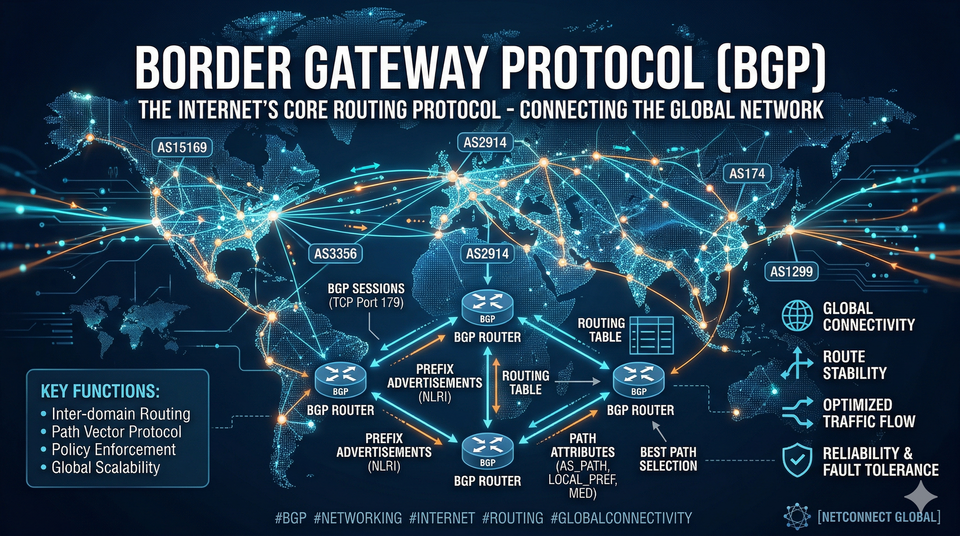
- Neighbours never discover, manual configuration is needed on both sides
- Neighbor must be reachable on TCP 179
- Multiple sessions to the same neighbor are not permitted (they will drop)
- Network command works differently with BGP than with other routing protocols
- Enterprise customers normally use a private AS number 64512-65535
BGP Packets
- Open - similar to Hello packet, only sent once to form the session
- Update - changes to routes
- Keepalive
- Notification - bad issue, causing the session to end
BGP States
- Idle - no route to the other router
- Active - trying to start the session
- Open Sent - send open message waiting for a response
- Open Confirm
- Established
Configuration
router bgp 500
  neighbor 150.1.1.1 remote-as 111
  neighbor 150.1.1.1 description ISP1
  neighbor 150.1.1.5 remote-as 222
  neighbor 150.1.1.5 description ISP2

show ip bgp summary
show ip bgp
debug ip bgp all
To disable a neighbour using no will clear all the configuration; instead, use shutdown: neighbor 1.1.1.1 shutdown
BGP Path Selection Process
- Largest Weight (local only, Cisco proprietary)
- Highest local preference
- Locally Originated
- Shortest AS path (Strongest attribute for route selection)
- Lowest Origin Type (i < e < ?)
- Lowest MED (Metric)
- eBGP over iBGP
- Lowest IGP metric to neighbor (default maximum paths is 1, no load balancing by default)
- Older route
- Lowest router ID
Advertising networks
By default, BGP will not advertise any networks.
ISPs will put on filters to only allow advertisements for IPs that have been agreed with them. BGP does not see bandwidth.
Network command takes a route from the existing routing table and advertises it to neighbors. Needs to be an exact match and the mask needs to be included if not classfull.
router bgp 500
  network 200.1.1.0 mask 255.255.255.0
redistribute connected command will clear the origin type.
router bgp 500
  redistribute connected
Filter by distribute list
Filter IPs to be advertised can be applied to the entire process or to a specific neighbour. filter applied to routes coming out of connected.
access-list 60 permit 200.1.1.0 0.0.0.255
access-list 60 permit 150.1.1.0 0.0.0.255

router bgp 500
  distribute-list 60 out connected
Filter by Route Map
access-list 61 permit any

route-map CHANGE_ORGIN
  match ip address 61
  set origin igp

router bgp 500
  redistribute connected route-map CHANGE_ORGIN
Summarization
auto-summary is now off by default, but in older versions it is on by default.
If you don't include the summary, it will also advertise the specific routes as well as the summary route.
router bgp 500
  aggregate-address 10.1.0.0 255.255.0.0 summary-only
Alternatively, create a static route for the summary. Will drop any packets that the router doesn't have a more specific route for.
ip route 10.1.0.0 255.255.0.0 null 0

router bgp 500
  network 10.1.0.0 mask 255.255.0.0